> For the complete documentation index, see [llms.txt](https://docs.zerowave.my.id/llms.txt). Markdown versions of documentation pages are available by appending `.md` to page URLs; this page is available as [Markdown](https://docs.zerowave.my.id/testnet/inery/task/task_1.md).

# Task\_1

<div align="center"><img src="https://user-images.githubusercontent.com/38981255/184088981-3f7376ae-7039-4915-98f5-16c3637ccea3.PNG" alt="" height="50"></div>

## TASK 1

### Running Master Node

### Update

```
sudo apt update && sudo apt upgrade -y
```

### Install Prerequisites Tools

```
sudo apt-get install -y make bzip2 automake libbz2-dev libssl-dev doxygen graphviz libgmp3-dev \
autotools-dev libicu-dev python2.7 python2.7-dev python3 python3-dev \
autoconf libtool curl zlib1g-dev sudo ruby libusb-1.0-0-dev \
libcurl4-gnutls-dev pkg-config patch llvm-7-dev clang-7 vim-common jq libncurses5
```

### Clone Inery Github

```
git clone https://github.com/inery-blockchain/inery-node
```

### Update Permission File

```
cd inery-node/inery.setup && chmod +x ine.py
./ine.py --export
cd; source .bashrc; cd -
```

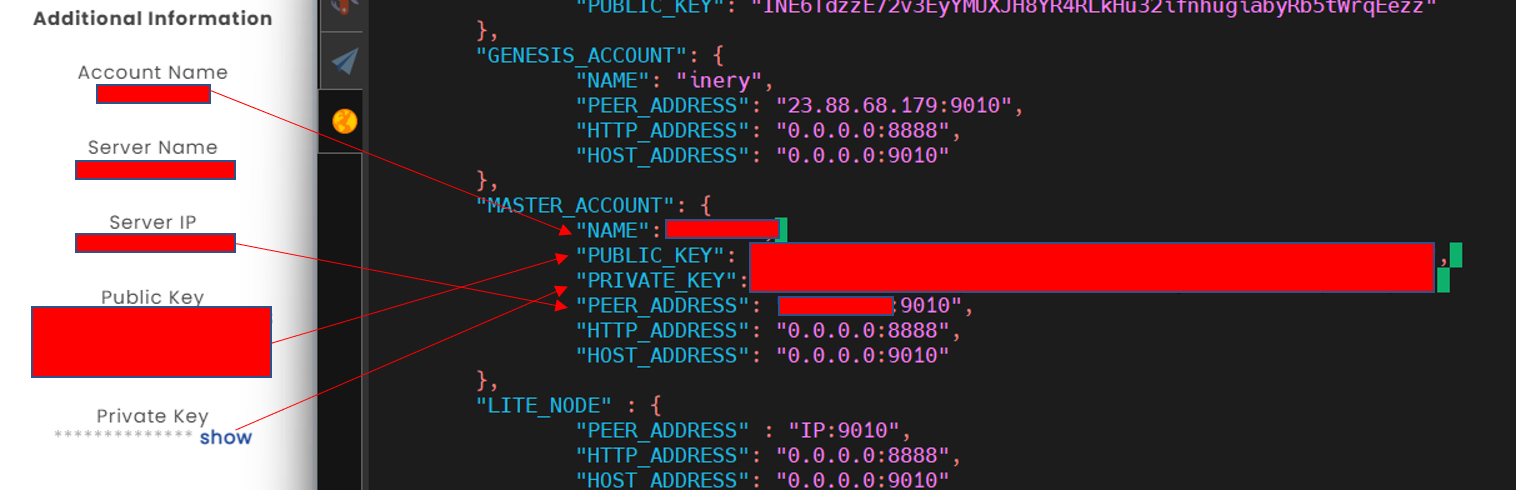
### Setting File config.json

```
cd tools
nano config.json
```

> for azure user use commmand `hostname -i` and change `PEER_ADDRESS` with that

<div align="center"><img src="https://user-images.githubusercontent.com/103183907/193441655-6f3ee6b7-8133-4d84-a846-67311cd5d706.png" alt=""></div>

### Synchronize Node

```
cd ..
screen -R inery
./ine.py --master && cd master.node/blockchain && tail -f nodine.log
```

> after log its running close screen with `CTRL + A + D` and it will take time 2-3 hours depend on block high the chain

After node is synchronize, continue to next step

### Synchronize Wallet in Dashboard

```
cline wallet create -n <USERNAME> -f file.txt
cline wallet import --private-key <PRIVATE_KEY>-n <USERNAME>
cline system regproducer <USERNAME> <PUBLIC_KEY> 0.0.0.0:9010
cline system makeprod approve <USERNAME> <USERNAME>
```

`<USERNAME>` = fill with your username `<PRIVATE_KEY>` = fill with your private key `<PUBLIC_KEY>` = fill with your public key

**Check Username on Explorer**

if username show in here task 1 is done

![](https://user-images.githubusercontent.com/103183907/193442131-35fda1c6-181f-4aa6-9827-749abc304966.png)


---

# Agent Instructions
This documentation is published with GitBook. GitBook is the documentation platform designed so that both humans and AI agents can read, navigate, and reason over technical content effectively. Learn more at gitbook.com.

## Querying This Documentation
If you need additional information that is not directly available in this page, you can query the documentation dynamically by asking a question.

Perform an HTTP GET request on the current page URL with the `ask` query parameter:

```
GET https://docs.zerowave.my.id/testnet/inery/task/task_1.md?ask=<question>
```

The question should be specific, self-contained, and written in natural language.
The response will contain a direct answer to the question and relevant excerpts and sources from the documentation.

Use this mechanism when the answer is not explicitly present in the current page, you need clarification or additional context, or you want to retrieve related documentation sections.